Computaco
Beta

Computatrum

An agent that uses your own computer for you — while you watch, and with you in control. Type a task; it moves the pointer and types, and asks before anything that matters.
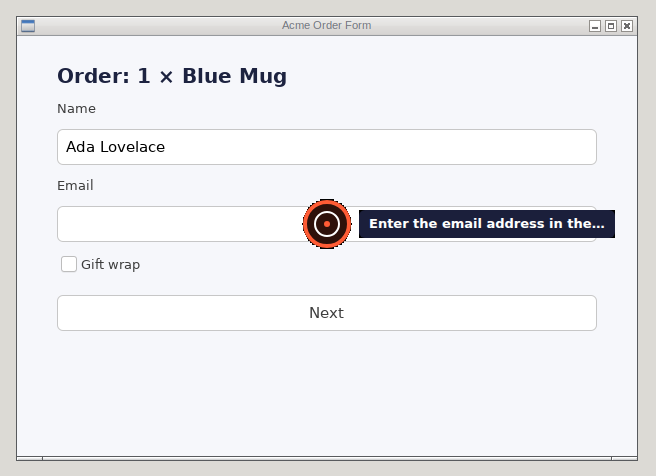
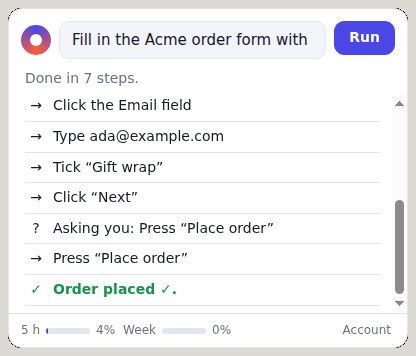
A real run on the hosted models: “Fill in the Acme order form… then go Next and place the order.” It is paused by a mouse move, resumed, and asks before placing the order. Recorded in a private test display; the 70 seconds are sped up where the model is thinking, and shown at real speed around the purchase.

It works your apps the way you would.

A ring and a label over the Email field: Enter the email address in the Email field
Shows each click firstA ring marks where the next action lands, for half a second, before it happens.
The bar: Done in 7 steps, with each step in plain words
Says what it is doingEvery step in plain words, in a small bar docked out of the way, with a big red Stop.
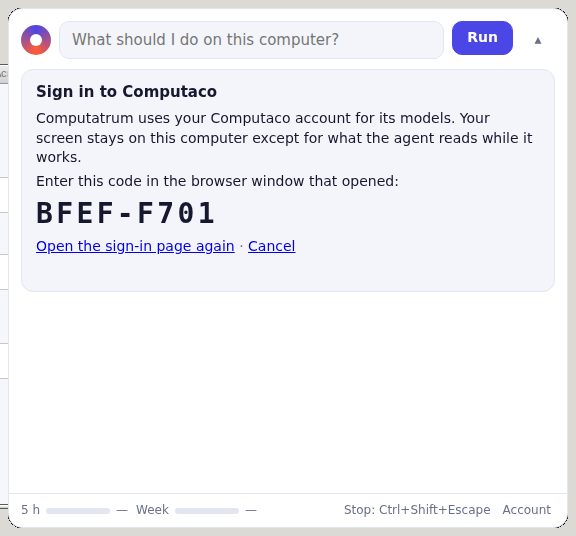
The bar showing a sign-in code to enter in the browser
No keys to pasteSign in with a code in your browser. The app holds a token that reaches only its own model calls.
Safety

You are always in charge.

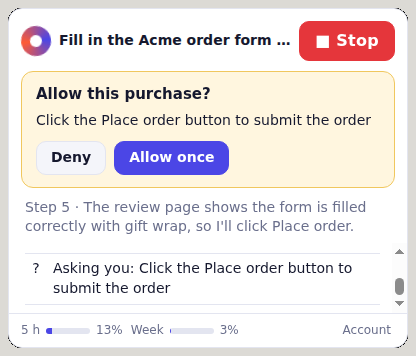
  • Asks before it sends, deletes or buys. Allow once or Deny — the card never takes focus, so a stray Enter cannot approve it.
  • Never types your passwords. Passwords, codes and card numbers are handed back to you to type.
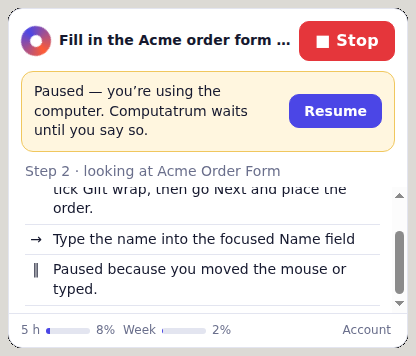
  • Pauses when you touch the mouse. Move it or type and nothing more is sent until you press Resume.
  • Stops at once. The Stop button, or Ctrl+Shift+Esc from anywhere (⌘⇧Esc on macOS, Ctrl+Alt+End on Windows).
Allow this purchase? Click the Place order button to submit the order. Deny, Allow once
Before a purchase
Paused — you're using the computer. Computatrum waits until you say so. Resume
After you move the mouse

How it works

Each step looks at the screen, decides one action, and checks it with you if it is risky. The models run on Computaco, so the app holds no provider key.

LookA screenshot and the accessibility tree, on your computer. Computatrum’s own windows are painted out.
ReadThe screenshot goes to a vision model on Workers AI through computaco.ai. This is the only time a screenshot leaves your computer, and none is kept.
Decidedeepseek-flash gets text only — the task, the outline and the steps so far — and picks one action.
ActThe action is sent once, against the screen it was planned on; if the screen changed, nothing is sent.
The full design

Pricing

Every Computaco plan includes Computatrum. A step is about one credit, counted in two rolling windows: one that refills 5 hours after its first call, and one a week after.

Free

50 credits per 5 hours, 200 a week.

Pro, $29 a month

1,000 credits per 5 hours, 4,000 a week.

Pay as you go

$2.50 per 1,000 credits past your windows, with a monthly cap you set — or for every call, if you build your own agent on the API.

All plans

Download

Version 0.1.0, an unsigned beta. Your operating system can warn about it; the steps below get past that.

FileSystemSize

Checksums are SHA-256.

Linux

X11 sessions (Wayland is not supported yet). Install the tools it drives, then run the AppImage:

sudo apt install xdotool x11-apps python3-gi gir1.2-atspi-2.0
chmod +x computatrum-*.AppImage
./computatrum-*.AppImage

Tested on Ubuntu 24.04 (arm64) by the end-to-end suite.

macOS

Not signed or notarized yet, so Gatekeeper blocks the first launch:

  1. Right-click Computatrum in Applications and choose Open, then Open again — or use System Settings › Privacy & Security › Open Anyway.
  2. Allow Screen Recording and Accessibility when asked, so it can see and act.
  3. Install the pointer tool it drives, which this beta does not bundle yet: brew install cliclick.

Untested on real Macs so far — tell us what breaks.

Windows

Not code-signed yet, so SmartScreen warns about the installer:

  1. Choose More info, then Run anyway.
  2. The stop key on Windows is Ctrl+Alt+End.

Untested on real Windows PCs so far — tell us what breaks.

Problems or questions: [email protected].